安装
1.Ubuntu下apt安装。
2.编译源码安装
Ps:官方要已停止维护,但ubuntu有维护。
编译
下载源码
官网http://ipsec-tools.sourceforge.net
Ubuntu仓库https://packages.ubuntu.com/xenial/ipsec-tools
Ps:由于该源码依赖于linux 2.4.xxx版本内核。目前编译使用的内核版本为linux-2.6.7。
配置环境,编译
解压linux源码到/usr/src/ 目录下
重命名为./linux
解压ipsec源码,编译
配置解析
安装完后,详见setkey的man page。
测试
配置虚拟机
使用4台虚拟机,两台做终端,两台做转发。
测试组网:
| Text Only |
|---|
| 10.8.7.72<------------>10.8.7.73
^ ^
| |
V V
192.168.3.3<----->192.168.3.1 192.168.5.1<------->192.168.5.5
|
| 虚拟机名称 |
IP1 |
IP2 |
gateway |
| A |
192.168.3.3 |
|
192.168.3.1 |
| B |
192.168.3.1 |
10.8.7.72 |
10.8.7.254 |
| C |
192.168.5.1 |
10.8.7.73 |
10.8.7.254 |
| D |
192.168.5.5 |
|
192.168.5.1 |
在虚拟机配置
虚拟机B和C上开启转发功能
| Bash |
|---|
| #路径:/etc/sysctl.conf
#修改内容:net.ipv4.ip_forward=1
#修改后重启设备。
sudo init 6
|
配置ipsec隧道
| Bash |
|---|
1
2
3
4
5
6
7
8
9
10
11
12
13
14 | #虚拟机B上的配置如下:
spdadd 192.168.3.0/24 192.168.5.0/24 icmp -P out ipsec esp/tunnel/10.8.7.72-10.8.7.73/require;
spdadd 192.168.5.0/24 192.168.3.0/24 icmp -P in ipsec esp/tunnel/10.8.7.73-10.8.7.72/require;
add 10.8.7.72 10.8.7.73 esp 24501 -m tunnel -E null -A hmac-sha1 "01234567890123456789" ;
add 10.8.7.73 10.8.7.72 esp 24502 -m tunnel -E null -A hmac-sha1 "01234567890123456789" ;
#虚拟机C上的配置如下:
spdadd 192.168.5.0/24 192.168.3.0/24 icmp -P out ipsec esp/tunnel/10.8.7.73-10.8.7.72/require;
spdadd 192.168.3.0/24 192.168.5.0/24 icmp -P in ipsec esp/tunnel/10.8.7.72-10.8.7.73/require;
add 10.8.7.72 10.8.7.73 esp 24501 -m tunnel -E null -A hmac-sha1 "01234567890123456789" ;
add 10.8.7.73 10.8.7.72 esp 24502 -m tunnel -E null -A hmac-sha1 "01234567890123456789" ;
#执行:
sudo setkey -f ipsec.conf
|

测试
1.192.168.3.3 ping 192.168.5.5
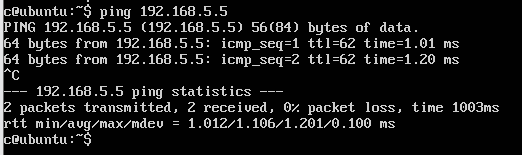
2.192.168.5.5 ping 192.168.3.3
这里只简单测试icmp报文,不再测试tcp或udp了。